Sunday, June 6, 2010

Encrypting/Decryptng a stirng using C#.

You have a string you want to be able to encrypt and decrypt—perhaps a password or software key—which will be stored in some form accessible by users, such as in a file, the registry, or even a field, that may be open to attack from malicious code.


Solution

Encrypting the string will prevent users from being able to read and decipher the information. The following class, CryptoString, contains two static methods to encrypt and decrypt a string and two static properties to retrieve the generated key and inititialization vector (IV—a random number used as a starting point to encrypt data) after encryption has occurred:
using System;
using System.Security.Cryptography;

public sealed class CryptoString
{
    private CryptoString( ) {}

    private static byte[] savedKey = null;
    private static byte[] savedIV = null;

     public static byte[] Key
    {
        get { return savedKey; }
        set { savedKey = value; }
    }

     public static byte[] IV
    {
        get { return savedIV; }
        set { savedIV = value; }
    }

    private static void RdGenerateSecretKey(RijndaelManaged rdProvider)
    {
        if (savedKey == null)
        {
            rdProvider.KeySize = 256;
            rdProvider.GenerateKey( );
            savedKey = rdProvider.Key;
        }
    }

    private static void RdGenerateSecretInitVector(RijndaelManaged rdProvider)
    {
        if (savedIV == null)
        {
            rdProvider.GenerateIV( );
            savedIV = rdProvider.IV;
        }
    }

    public static string Encrypt(string originalStr)
    {
        // Encode data string to be stored in memory
        byte[] originalStrAsBytes = Encoding.ASCII.GetBytes(originalStr);
        byte[] originalBytes = {};

        // Create MemoryStream to contain output
        MemoryStream memStream = new MemoryStream(originalStrAsBytes.Length);

        RijndaelManaged rijndael = new RijndaelManaged( );

        // Generate and save secret key and init vector
        RdGenerateSecretKey(rijndael);
        RdGenerateSecretInitVector(rijndael);

        if (savedKey == null || savedIV == null)
        {
            throw (new NullReferenceException(
                    "savedKey and savedIV must be non-null."));
        }

        // Create encryptor, and stream objects
        ICryptoTransform rdTransform = rijndael.CreateEncryptor((byte[])savedKey.
                            Clone( ),(byte[])savedIV.Clone( ));
        CryptoStream cryptoStream = new CryptoStream(memStream, rdTransform, 
                            CryptoStreamMode.Write);

        // Write encrypted data to the MemoryStream
        cryptoStream.Write(originalStrAsBytes, 0, originalStrAsBytes.Length);
        cryptoStream.FlushFinalBlock( );
        originalBytes = memStream.ToArray( );

        // Release all resources
        memStream.Close( );
        cryptoStream.Close( );
        rdTransform.Dispose( );
        rijndael.Clear( );

        // Convert encrypted string
        string encryptedStr = Convert.ToBase64String(originalBytes);
        return (encryptedStr);
    }

    public static string Decrypt(string encryptedStr)
    {
        // Unconvert encrypted string
        byte[] encryptedStrAsBytes = Convert.FromBase64String(encryptedStr);
        byte[] initialText = new Byte[encryptedStrAsBytes.Length];

        RijndaelManaged rijndael = new RijndaelManaged( );
        MemoryStream memStream = new MemoryStream(encryptedStrAsBytes);

        if (savedKey == null || savedIV == null)
        {
            throw (new NullReferenceException(
                    "savedKey and savedIV must be non-null."));
        }

        // Create decryptor, and stream objects
        ICryptoTransform rdTransform = rijndael.CreateDecryptor((byte[])savedKey.
                            Clone( ),(byte[])savedIV.Clone( ));
        CryptoStream cryptoStream = new CryptoStream(memStream, rdTransform, 
                            CryptoStreamMode.Read);

        // Read in decrypted string as a byte[]
        cryptoStream.Read(initialText, 0, initialText.Length);

        // Release all resources
        memStream.Close( );
        cryptoStream.Close( );
        rdTransform.Dispose( );
        rijndael.Clear( );

        // Convert byte[] to string
        string decryptedStr = Encoding.ASCII.GetString(initialText);
        return (decryptedStr);
    }
}

Discussion

The CryptoString class follows a singleton design pattern. This class contains only static members, except for the private instance constructor, which prevents anyone from directly creating an object from this class.
This class uses the Rijndael algorithm to encrypt and decrypt a string. This algorithm is found in the System.Security.Cryptography.RijndaelManaged class. This algorithm requires a secret key and an initialization vector; both are byte arrays. A random secret key can be generated for you by calling the GenerateKey method on the RijndaelManaged class. This method accepts no parameters and returns void. The generated key is placed in the Key property of the RijndaelManaged class. The GenerateIV method generates a random initialization vector and places this vector in the IV property of the RijndaelManaged class.
The byte array values in the Key and IV properties must be stored for later use and not modified. This is due to the nature of private-key encryption classes, such as RijndaelManaged. The Key and IV values must be used by both the encryption and decryption routines to successfully encrypt and decrypt data.
The SavedKey and SavedIV private static fields contain the secret key and initialization vector, respectively. The secret key is used by the encryption and decryption methods to encrypt and decrypt data. This key must be used by both the encryption and decryption methods in order to successfully encrypt and then decrypt the data. This is why there are public properties for these values, so they can be stored somewhere secure for later use. This means that any strings encrypted by this object must be decrypted by this object. The initialization vector is used to prevent anyone from attempting to decipher the secret key.
There are two methods in the CryptoString class, RdGenerateSecretKey and RdGenerateSecretInitVector, that are used to generate a secret key and initialization vector, when none exist. The RdGenerateSecretKey method generates the secret key, which is placed in the SavedKey field. Likewise, the RdGenerateSecretInitVector generates the initialization vector, which is placed in the SavedIV field. There is only one key and one IV generated for this class. This enables the encryption and decryption routines to have access to the same key and IV information at all times.
The Encrypt and Decrypt methods of the CryptoString class do the actual work of encrypting and decrypting a string, respectively. The Encrypt method accepts a string that you want to encrypt and returns an encrypted string. The following code calls this method and passes in a string to be encrypted:
string encryptedString = CryptoString.Encrypt("MyPassword");
Console.WriteLine("encryptedString: " + encryptedString);
// get the key and IV used so you can decrypt it later
byte [] key = CryptoString.Key;
byte [] IV = CryptoString.IV;
Once the string is encrypted, the key and IV are stored for later decryption. This method displays:
encryptedString: Ah4vkmVKpwMYRT97Q8cVgQ==
The following code sets the key and IV used to encrypt the string, then calls the Decrypt method to decrypt the previously encrypted string:
CryptoString.Key = key;
CryptoString.IV = IV;
string decryptedString = CryptoString.Decrypt(encryptedString);
Console.WriteLine("decryptedString: " + decryptedString);
This method displays:
decryptedString: MyPassword
There does not seem to be any problems with using escape sequences such as \r, \n, \r\n, or \t in the string to be encrypted. In addition, using a quoted string literal, with or without escaped characters, works without a problem:
@"MyPassword"

Friday, June 4, 2010

How Google Works?

If you aren’t interested in learning how Google creates the index and the database of documents that it accesses when processing a query, skip this description. I adapted the following overview from Chris Sherman and Gary Price’s wonderful description of How Search Engines Work in Chapter 2 of The Invisible Web (CyberAge Books, 2001).
Google runs on a distributed network of thousands of low-cost computers and can therefore carry out fast parallel processing. Parallel processing is a method of computation in which many calculations can be performed simultaneously, significantly speeding up data processing. Google has three distinct parts:
  • Googlebot, a web crawler that finds and fetches web pages.
  • The indexer that sorts every word on every page and stores the resulting index of words in a huge database.
  • The query processor, which compares your search query to the index and recommends the documents that it considers most relevant.
Let’s take a closer look at each part.


1. Googlebot, Google’s Web Crawler

Googlebot is Google’s web crawling robot, which finds and retrieves pages on the web and hands them off to the Google indexer. It’s easy to imagine Googlebot as a little spider scurrying across the strands of cyberspace, but in reality Googlebot doesn’t traverse the web at all. It functions much like your web browser, by sending a request to a web server for a web page, downloading the entire page, then handing it off to Google’s indexer.
Googlebot consists of many computers requesting and fetching pages much more quickly than you can with your web browser. In fact, Googlebot can request thousands of different pages simultaneously. To avoid overwhelming web servers, or crowding out requests from human users, Googlebot deliberately makes requests of each individual web server more slowly than it’s capable of doing.
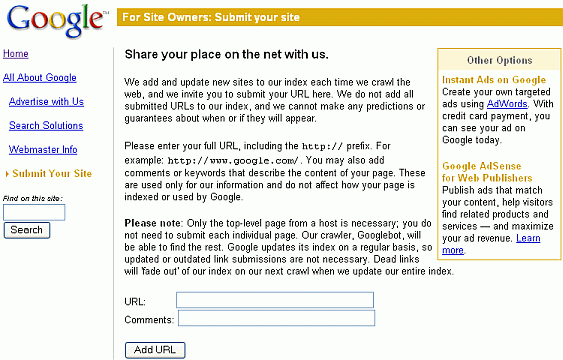
Googlebot finds pages in two ways: through an add URL form, www.google.com/addurl.html, and through finding links by crawling the web.
Screen shot of web page for adding a URL to Google.
Unfortunately, spammers figured out how to create automated bots that bombarded the add URL form with millions of URLs pointing to commercial propaganda. Google rejects those URLs submitted through its Add URL form that it suspects are trying to deceive users by employing tactics such as including hidden text or links on a page, stuffing a page with irrelevant words, cloaking (aka bait and switch), using sneaky redirects, creating doorways, domains, or sub-domains with substantially similar content, sending automated queries to Google, and linking to bad neighbors. So now the Add URL form also has a test: it displays some squiggly letters designed to fool automated “letter-guessers”; it asks you to enter the letters you see — something like an eye-chart test to stop spambots.
When Googlebot fetches a page, it culls all the links appearing on the page and adds them to a queue for subsequent crawling. Googlebot tends to encounter little spam because most web authors link only to what they believe are high-quality pages. By harvesting links from every page it encounters, Googlebot can quickly build a list of links that can cover broad reaches of the web. This technique, known as deep crawling, also allows Googlebot to probe deep within individual sites. Because of their massive scale, deep crawls can reach almost every page in the web. Because the web is vast, this can take some time, so some pages may be crawled only once a month.
Although its function is simple, Googlebot must be programmed to handle several challenges. First, since Googlebot sends out simultaneous requests for thousands of pages, the queue of “visit soon” URLs must be constantly examined and compared with URLs already in Google’s index. Duplicates in the queue must be eliminated to prevent Googlebot from fetching the same page again. Googlebot must determine how often to revisit a page. On the one hand, it’s a waste of resources to re-index an unchanged page. On the other hand, Google wants to re-index changed pages to deliver up-to-date results.
To keep the index current, Google continuously recrawls popular frequently changing web pages at a rate roughly proportional to how often the pages change. Such crawls keep an index current and are known as fresh crawls. Newspaper pages are downloaded daily, pages with stock quotes are downloaded much more frequently. Of course, fresh crawls return fewer pages than the deep crawl. The combination of the two types of crawls allows Google to both make efficient use of its resources and keep its index reasonably current.


2. Google’s Indexer

Googlebot gives the indexer the full text of the pages it finds. These pages are stored in Google’s index database. This index is sorted alphabetically by search term, with each index entry storing a list of documents in which the term appears and the location within the text where it occurs. This data structure allows rapid access to documents that contain user query terms.
To improve search performance, Google ignores (doesn’t index) common words called stop words (such as the, is, on, or, of, how, why, as well as certain single digits and single letters). Stop words are so common that they do little to narrow a search, and therefore they can safely be discarded. The indexer also ignores some punctuation and multiple spaces, as well as converting all letters to lowercase, to improve Google’s performance.

3. Google’s Query Processor

The query processor has several parts, including the user interface (search box), the “engine” that evaluates queries and matches them to relevant documents, and the results formatter.
PageRank is Google’s system for ranking web pages. A page with a higher PageRank is deemed more important and is more likely to be listed above a page with a lower PageRank.
Google considers over a hundred factors in computing a PageRank and determining which documents are most relevant to a query, including the popularity of the page, the position and size of the search terms within the page, and the proximity of the search terms to one another on the page. A patent application discusses other factors that Google considers when ranking a page. Visit SEOmoz.org’s report for an interpretation of the concepts and the practical applications contained in Google’s patent application.
Google also applies machine-learning techniques to improve its performance automatically by learning relationships and associations within the stored data. For example, the spelling-correcting system uses such techniques to figure out likely alternative spellings. Google closely guards the formulas it uses to calculate relevance; they’re tweaked to improve quality and performance, and to outwit the latest devious techniques used by spammers.
Indexing the full text of the web allows Google to go beyond simply matching single search terms. Google gives more priority to pages that have search terms near each other and in the same order as the query. Google can also match multi-word phrases and sentences. Since Google indexes HTML code in addition to the text on the page, users can restrict searches on the basis of where query words appear, e.g., in the title, in the URL, in the body, and in links to the page, options offered by Google’s Advanced Search Form and Using Search Operators (Advanced Operators).
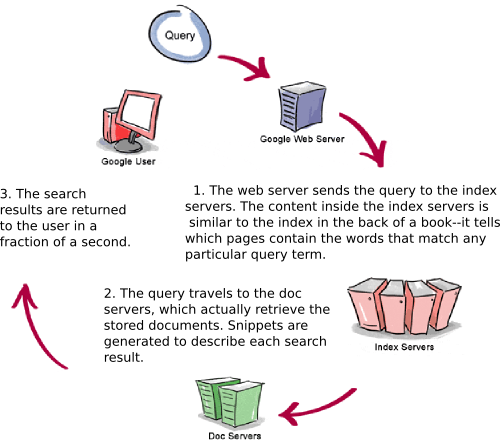
Let’s see how Google processes a query.
1. The web server sends the query to the index        servers. The content inside the index servers is similar        to the index in the back of a book--it tells which pages        contain the words that match any particular query       term.          2. The query travels to the doc servers, which   actually retrieve the stored documents. Snippets are    generated to describe each search result.       3. The search results are returned to the user          in a fraction of a second.
For more information on how Google works, take a look at the following articles.

How Google PageRank is calculated.?


What is PageRank?


PageRank is a numeric value that represents how important a page is on the web. Google figures that when one page links to another page, it is effectively casting a vote for the other page. The more votes that are cast for a page, the more important the page must be. Also, the importance of the page that is casting the vote determines how important the vote itself is. Google calculates a page's importance from the votes cast for it. How important each vote is is taken into account when a page's PageRank is calculated.
PageRank is Google's way of deciding a page's importance. It matters because it is one of the factors that determines a page's ranking in the search results. It isn't the only factor that Google uses to rank pages, but it is an important one.


From here on in, we'll occasionally refer to PageRank as "PR".


How is PageRank calculated?

To calculate the PageRank for a page, all of its inbound links are taken into account. These are links from within the site and links from outside the site.
PR(A) = (1-d) + d(PR(t1)/C(t1) + ... + PR(tn)/C(tn))
That's the equation that calculates a page's PageRank. It's the original one that was published when PageRank was being developed, and it is probable that Google uses a variation of it but they aren't telling us what it is. It doesn't matter though, as this equation is good enough.
In the equation 't1 - tn' are pages linking to page A, 'C' is the number of outbound links that a page has and 'd' is a damping factor, usually set to 0.85.
We can think of it in a simpler way:-
a page's PageRank = 0.15 + 0.85 * (a "share" of the PageRank of every page that links to it)
"share" = the linking page's PageRank divided by the number of outbound links on the page.
A page "votes" an amount of PageRank onto each page that it links to. The amount of PageRank that it has to vote with is a little less than its own PageRank value (its own value * 0.85). This value is shared equally between all the pages that it links to.
From this, we could conclude that a link from a page with PR4 and 5 outbound links is worth more than a link from a page with PR8 and 100 outbound links. The PageRank of a page that links to yours is important but the number of links on that page is also important. The more links there are on a page, the less PageRank value your page will receive from it. 


If the PageRank value differences between PR1, PR2,.....PR10 were equal then that conclusion would hold up, but many people believe that the values between PR1 and PR10 (the maximum) are set on a logarithmic scale, and there is very good reason for believing it. Nobody outside Google knows for sure one way or the other, but the chances are high that the scale is logarithmic, or similar. If so, it means that it takes a lot more additional PageRank for a page to move up to the next PageRank level that it did to move up from the previous PageRank level. The result is that it reverses the previous conclusion, so that a link from a PR8 page that has lots of outbound links is worth more than a link from a PR4 page that has only a few outbound links.
Whichever scale Google uses, we can be sure of one thing. A link from another site increases our site's PageRank. Just remember to avoid links from link farms.
Note that when a page votes its PageRank value to other pages, its own PageRank is not reduced by the value that it is voting. The page doing the voting doesn't give away its PageRank and end up with nothing. It isn't a transfer of PageRank. It is simply a vote according to the page's PageRank value. It's like a shareholders meeting where each shareholder votes according to the number of shares held, but the shares themselves aren't given away. Even so, pages do lose some PageRank indirectly, as we'll see later.
Ok so far? Good. Now we'll look at how the calculations are actually done.
For a page's calculation, its existing PageRank (if it has any) is abandoned completely and a fresh calculation is done where the page relies solely on the PageRank "voted" for it by its current inbound links, which may have changed since the last time the page's PageRank was calculated.
The equation shows clearly how a page's PageRank is arrived at. But what isn't immediately obvious is that it can't work if the calculation is done just once. Suppose we have 2 pages, A and B, which link to each other, and neither have any other links of any kind. This is what happens:-
Step 1: Calculate page A's PageRank from the value of its inbound links
Page A now has a new PageRank value. The calculation used the value of the inbound link from page B. But page B has an inbound link (from page A) and its new PageRank value hasn't been worked out yet, so page A's new PageRank value is based on inaccurate data and can't be accurate.
Step 2: Calculate page B's PageRank from the value of its inbound links
Page B now has a new PageRank value, but it can't be accurate because the calculation used the new PageRank value of the inbound link from page A, which is inaccurate.
It's a Catch 22 situation. We can't work out A's PageRank until we know B's PageRank, and we can't work out B's PageRank until we know A's PageRank.
Now that both pages have newly calculated PageRank values, can't we just run the calculations again to arrive at accurate values? No. We can run the calculations again using the new values and the results will be more accurate, but we will always be using inaccurate values for the calculations, so the results will always be inaccurate.
The problem is overcome by repeating the calculations many times. Each time produces slightly more accurate values. In fact, total accuracy can never be achieved because the calculations are always based on inaccurate values. 40 to 50 iterations are sufficient to reach a point where any further iterations wouldn't produce enough of a change to the values to matter. This is precisiely what Google does at each update, and it's the reason why the updates take so long.
One thing to bear in mind is that the results we get from the calculations are proportions. The figures must then be set against a scale (known only to Google) to arrive at each page's actual PageRank. Even so, we can use the calculations to channel the PageRank within a site around its pages so that certain pages receive a higher proportion of it than others.


NOTE:
You may come across explanations of PageRank where the same equation is stated but the result of each iteration of the calculation is added to the page's existing PageRank. The new value (result + existing PageRank) is then used when sharing PageRank with other pages. These explanations are wrong for the following reasons:-

1. They quote the same, published equation - but then change it
from PR(A) = (1-d) + d(......) to PR(A) = PR(A) + (1-d) + d(......)
It isn't correct, and it isn't necessary.
2. We will be looking at how to organize links so that certain pages end up with a larger proportion of the PageRank than others. Adding to the page's existing PageRank through the iterations produces different proportions than when the equation is used as published. Since the addition is not a part of the published equation, the results are wrong and the proportioning isn't accurate.
According to the published equation, the page being calculated starts from scratch at each iteration. It relies solely on its inbound links. The 'add to the existing PageRank' idea doesn't do that, so its results are necessarily wrong.
[TOP]
C link. So adding an extra link from a page causes the page to lose PageRank indirectly if any of the pages that it links to return the link. If the pages that it links to don't return the link, then no PageRank loss would have occured. To make it more complicated, if the link is returned even indirectly (via a page that links to a page that links to a page etc), the page will lose a little PageRank. This isn't really important with internal links, but it does matter when linking to pages outside the site.


Example 5: new pages
Adding new pages to a site is an important way of increasing a site's total PageRank because each new page will add an average of 1 to the total. Once the new pages have been added, their new PageRank can be channeled to the important pages. We'll use the calculator to demonstrate these.
Let's add 3 new pages to Example 3 [view]. Three new pages but they don't do anything for us yet. The small increase in the Total, and the new pages' 0.15, are unrealistic as we shall see. So let's link them into the site.
Link each of the new pages to the important page, page A [view]. Notice that the Total PageRank has doubled, from 3 (without the new pages) to 6. Notice also that page A's PageRank has almost doubled.
There is one thing wrong with this model. The new pages are orphans. They wouldn't get into Google's index, so they wouldn't add any PageRank to the site and they wouldn't pass any PageRank to page A. They each need to be linked to from at least one other page. If page A is the important page, the best page to put the links on is, surprisingly, page A [view]. You can play around with the links but, from page A's point of view, there isn't a better place for them.
It is not a good idea for one page to link to a large number of pages so, if you are adding many new pages, spread the links around. The chances are that there is more than one important page in a site, so it is usually suitable to spread the links to and from the new pages. You can use the calculator to experiment with mini-models of a site to find the best links that produce the best results for its important pages.


Examples summary
You can see that, by organising the internal links, it is possible to channel a site's PageRank to selected pages. Internal links can be arranged to suit a site's PageRank needs, but it is only useful if Google knows about the pages, so do try to ensure that Google spiders them.


Inbound and Outbound links
Examples of these could be given but it is probably clearer to read about them (below) and to 'play' with them in the calculator.


Questions

When a page has several links to another page, are all the links counted?
E.g. if page A links once to page B and 3 times to page C, does page C receive 3/4 of page A's shareable PageRank?
The PageRank concept is that a page casts votes for one or more other pages. Nothing is said in the original PageRank document about a page casting more than one vote for a single page. The idea seems to be against the PageRank concept and would certainly be open to manipulation by unrealistically proportioning votes for target pages. E.g. if an outbound link, or a link to an unimportant page, is necessary, add a bunch of links to an important page to minimize the effect.
Since we are unlikely to get a definitive answer from Google, it is reasonable to assume that a page can cast only one vote for another page, and that additional votes for the same page are not counted.
When a page links to itself, is the link counted?
Again, the concept is that pages cast votes for other pages. Nothing is said in the original document about pages casting votes for themselves. The idea seems to be against the concept and, also, it would be another way to manipulate the results. So, for those reasons, it is reasonable to assume that a page can't vote for itself, and that such links are not counted.
[TOP]


Inbound links


Inbound links (links into the site from the outside) are one way to increase a site's total PageRank. The other is to add more pages. Where the links come from doesn't matter. Google recognizes that a webmaster has no control over other sites linking into a site, and so sites are not penalized because of where the links come from. There is an exception to this rule but it is rare and doesn't concern this article. It isn't something that a webmaster can accidentally do.
The linking page's PageRank is important, but so is the number of links going from that page. For instance, if you are the only link from a page that has a lowly PR2, you will receive an injection of 0.15 + 0.85(2/1) = 1.85 into your site, whereas a link from a PR8 page that has another 99 links from it will increase your site's PageRank by 0.15 + 0.85(7/100) = 0.2095. Clearly, the PR2 link is much better - or is it? See here for a probable reason why this is not the case.
Once the PageRank is injected into your site, the calculations are done again and each page's PageRank is changed. Depending on the internal link structure, some pages' PageRank is increased, some are unchanged but no pages lose any PageRank.
It is beneficial to have the inbound links coming to the pages to which you are channeling your PageRank. A PageRank injection to any other page will be spread around the site through the internal links. The important pages will receive an increase, but not as much of an increase as when they are linked to directly. The page that receives the inbound link, makes the biggest gain.
It is easy to think of our site as being a small, self-contained network of pages. When we do the PageRank calculations we are dealing with our small network. If we make a link to another site, we lose some of our network's PageRank, and if we receive a link, our network's PageRank is added to. But it isn't like that. For the PageRank calculations, there is only one network - every page that Google has in its index. Each iteration of the calculation is done on the entire network and not on individual websites.
Because the entire network is interlinked, and every link and every page plays its part in each iteration of the calculations, it is impossible for us to calculate the effect of inbound links to our site with any realistic accuracy.
[TOP]


So how much additional PageRank do we need to move up the toolbar?

First, let me explain in more detail why the values shown in the Google toolbar are not the actual PageRank figures. According to the equation, and to the creators of Google, the billions of pages on the web average out to a PageRank of 1.0 per page. So the total PageRank on the web is equal to the number of pages on the web * 1, which equals a lot of PageRank spread around the web.
The Google toolbar range is from 1 to 10. (They sometimes show 0, but that figure isn't believed to be a PageRank calculation result). What Google does is divide the full range of actual PageRanks on the web into 10 parts - each part is represented by a value as shown in the toolbar. So the toolbar values only show what part of the overall range a page's PageRank is in, and not the actual PageRank itself. The numbers in the toolbar are just labels.
Whether or not the overall range is divided into 10 equal parts is a matter for debate - Google aren't saying. But because it is much harder to move up a toolbar point at the higher end than it is at the lower end, many people (including me) believe that the divisions are based on a logarithmic scale, or something very similar, rather than the equal divisions of a linear scale.
Let's assume that it is a logarithmic, base 10 scale, and that it takes 10 properly linked new pages to move a site's important page up 1 toolbar point. It will take 100 new pages to move it up another point, 1000 new pages to move it up one more, 10,000 to the next, and so on. That's why moving up at the lower end is much easier that at the higher end.
In reality, the base is unlikely to be 10. Some people think it is around the 5 or 6 mark, and maybe even less. Even so, it still gets progressively harder to move up a toolbar point at the higher end of the scale.
Note that as the number of pages on the web increases, so does the total PageRank on the web, and as the total PageRank increases, the positions of the divisions in the overall scale must change. As a result, some pages drop a toolbar point for no 'apparent' reason. If the page's actual PageRank was only just above a division in the scale, the addition of new pages to the web would cause the division to move up slightly and the page would end up just below the division. Google's index is always increasing and they re-evaluate each of the pages on more or less a monthly basis. It's known as the "Google dance". When the dance is over, some pages will have dropped a toolbar point. A number of new pages might be all that is needed to get the point back after the next dance.
The toolbar value is a good indicator of a page's PageRank but it only indicates that a page is in a certain range of the overall scale. One PR5 page could be just above the PR5 division and another PR5 page could be just below the PR6 division - almost a whole division (toolbar point) between them.
[TOP]


Miscellaneous


The Google toolbar
If you have the Google toolbar installed in your browser, you will be used to seeing each page's PageRank as you browse the web. But all isn't always as it seems. Many pages that Google displays the PageRank for haven't been indexed in Google and certainly don't have any PageRank in their own right. What is happening is that one or more pages on the site have been indexed and a PageRank has been calculated. The PageRank figure for the site's pages that haven't been indexed is allocated on the fly - just for your toolbar. The PageRank itself doesn't exist.

It's important to know this so that you can avoid exchanging links with pages that really don't have any PageRank of their own. Before making exchanges, search for the page on Google to make sure that it is indexed.
Sub-directories
Some people believe that Google drops a page's PageRank by a value of 1 for each sub-directory level below the root directory. E.g. if the value of pages in the root directory is generally around 4, then pages in the next directory level down will be generally around 3, and so on down the levels. Other people (including me) don't accept that at all. Either way, because some spiders tend to avoid deep sub-directories, it is generally considered to be beneficial to keep directory structures shallow (directories one or two levels below the root).

ODP and Yahoo!
It used to be thought that Google gave a Pagerank boost to sites that are listed in the Yahoo! and ODP (a.k.a. DMOZ) directories, but these days general opinion is that they don't. There is certainly a PageRank gain for sites that are listed in those directories, but the reason for it is now thought to be this:-

Google spiders the directories just like any other site and their pages have decent PageRank and so they are good inbound links to have. In the case of the ODP, Google's directory is a copy of the ODP directory. Each time that sites are added and dropped from the ODP, they are added and dropped from Google's directory when they next update it. The entry in Google's directory is yet another good, PageRank boosting, inbound link. Also, the ODP data is used for searches on a myriad of websites - more inbound links!
Listings in the ODP are free but, because sites are reviewed by hand, it can take quite a long time to get in. The sooner a working site is submitted, the better. For tips on submitting to DMOZ, see this this DMOZ article.